Easiest Shutdown
Shut down your PC in one click. A tray app with a glassy, animated countdown you can still cancel.
One click, then a window to change your mind
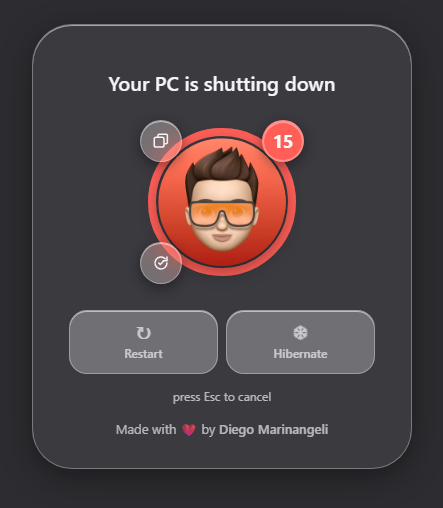
Click the tray icon — or just launch the app again — and a full-screen glass overlay appears with a 15-second countdown ring around your avatar. Click the avatar to shut down right away, or press Esc anytime to abort.
Lives in the tray
No taskbar clutter — starts hidden in the background and waits for a click.
15-second countdown
A circular progress ring drains around a custom round avatar.
Instant shutdown
Click your avatar and the PC shuts down right away, no waiting.
Cancel anytime
Press Esc and the shutdown is aborted.
Restart too
A toggle switches the countdown to reboot instead of shutting down.
Hibernate
One click to hibernate the PC instead of shutting it down; unavailable modes are reported by the app.
Close all windows
Gracefully asks every open app to close, like right-click → "Close window" — no forced shutdown. Linux uses wmctrl/xdotool for X11 and the standard GTK quit action for supported GNOME/Wayland apps.
Free up disk space
Clears safe user caches and reclaims filesystem/page cache on Linux, with the same protected cleanup behavior on Windows.
Main display
The countdown overlay opens on your primary monitor.
Liquid-glass UI
Translucent, blurred, rounded panels throughout the whole app.